Keyence compatibility and connection outline.
MultiWire MeasureOD® supports the Keyence LS-9501 and LS-9501P controllers, including two-head operation. The customer supplies the computer, measurement hardware, applicable cabling, and mechanical fixturing.
Keyence head configurations
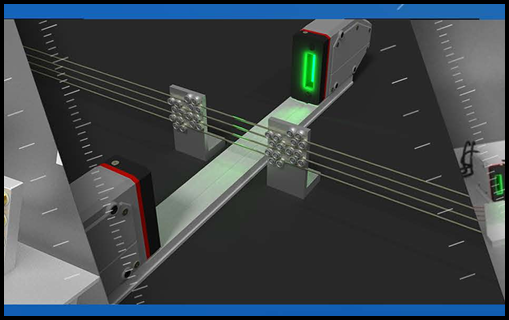
MultiWire MeasureOD® measures one to six wires with supported Keyence LS-9501 series hardware. The images below show the paired optical micrometer heads and example multi-wire measurement arrangements.
| Manufacturer | Model | MultiWire support |
|---|---|---|
| Keyence | LS-9501 controller | Supported |
| Keyence | LS-9501P controller | Supported |
| Keyence | LS-9006 / LS-9006M measurement heads | Supported with compatible controller |
| Keyence | LS-9030 / LS-9030M measurement heads | Supported with compatible controller |
| Keyence | LS-9120 / LS-9120M measurement heads | Supported with compatible controller |
MultiWire MeasureOD® supports configurations using two measurement heads. Select compatible heads and controller hardware for the required measurement range.
RS-232 connection outline
Connect the controller to the Windows computer using the Keyence OP-96368 serial cable and OP-26401 RS-232C conversion adapter with a 9-pin D-Sub connector.
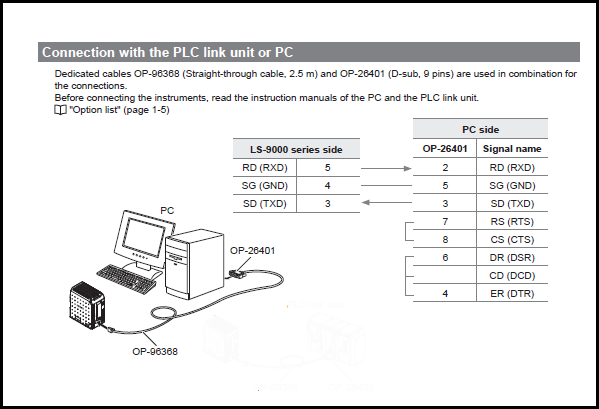
The software searches available computer serial ports for the connected Keyence controller and configures the controller for measurement. Keyence LS-Navigator2 is not required for normal MultiWire MeasureOD® operation.
The buyer supplies all applicable cabling and adapters for the selected computer and measurement system.
Computer, wire path, and network
- Windows 10 or Windows 11 computer.
- Customer-supplied Keyence LS-9501 or LS-9501P controller and compatible measurement head(s).
- Customer-supplied computer-to-controller cable and adapter.
- Customer-supplied mechanical fixture to position the wires through the optical measurement field.
- The configured wire count must match the number of wires present. MultiWire MeasureOD® supports one to six wires; changing the configured count requires restarting the software.
An internet connection is required. The customer’s network must allow communication with RTA’s server at 74.208.165.58 over TCP port 3306.
The Keyence optical micrometer and computer are not included with the software. MultiWire MeasureOD® does not calibrate the Keyence controller or heads.